
KPT-1124



WARRANTY TERMS & CONDITIONS
Our goods come with guarantees that cannot be excluded under the Australian & New Zealand Consumer Law. You are entitled to a replacement or refund for a major failure and for compensation for any other reasonably foreseeable loss or damage. You are also entitled to have the goods repaired or replaced if the goods fail to be of acceptable quality and the failure does not amount to a major failure.
This warranty is provided in addition to your rights under the Australian & New Zealand Consumer Law.
Nanocam Plus warrants that this product is free from defects in material and workmanship for a period of 12 months from the date of purchase or for the period stated on the packaging. This warranty is only valid where you have used the product in accordance with any recommendations or instructions provided by Nanocam Plus.
This warranty excludes defects resulting from alterations of the product, accident, misuse, abuse or neglect.
In order to claim the warranty, you must return the product to the retailer from which it was purchased or if that retailer is part of a National network, a store within that chain, along with satisfactory proof of purchase. The retailer will then return the goods to Nanocam Plus.
Nanocam Plus will repair, replace or refurbish the product at its discretion. The retailer will contact you when the product is ready for collection. All costs involved in claiming this warranty, including the cost of the retailer sending the product to Nanocam Plus, will be borne by you.
Email: info@nanocamplus.com.au
INDEMNITY
You agree to defend, indemnify and hold harmless Nanocam Plus and its subsidiaries and affiliates from and against any and all claims, proceedings, injuries, liabilities, losses, costs and expenses (including reasonable legal fees), including but not limited to, claims alleging negligence, invasion of privacy, copyright infringement and/or trademark infringement against Nanocam Plus and its subsidiaries and affiliates or the Nanocam Plus services, relating to or arising out of your breach of any provision of these terms, your misuse of the Nanocam Plus or Nanocam Plus services, or your unauthorized modification or alteration of products or software.
WARRANTY AND WARRANTY DISCLAIMER
Nanocam Plus has a limited warranty on whereby Nanocam Plus warrants to you and only to you that the on Nanocam Plus vehicle dash cameras, mirror dash cameras, front, rear and reversing cameras, charging devices, mirror monitor devices, computer software, or other hardware will be free from defects in materials and workmanship for one (1) year from the date of your purchase of the on Nanocam Plus vehicle dash cameras, mirror dash cameras, front, rear and reversing cameras, charging devices, mirror monitor devices, computer software, or other hardware (unless a longer warranty period is required by law).
The specifics of this Nanocam Plus limited warranty are at https://www.nanocamplus.com.au/warranty
To the extent possible under governing law, other than the above product warranty for the Nanocam Plus vehicle dash cameras, mirror dash cameras, front, rear and reversing cameras, charging devices, mirror monitor devices, computer software, or other hardware, you understand and agree that the Nanocam Plus services are provided on an “as is” and “as available” basis. Nanocam Plus makes no warranty that the Nanocam Plus services will meet your requirements or that use of the Nanocam Plus services will be uninterrupted, timely, secure or error-free nor does Nanocam Plus make any warranty as to the accuracy or reliability of any information obtained through the Nanocam Plus services (including third party content), that any defects in the Nanocam Plus services will be corrected or that the Nanocam Plus products or Nanocam Plus services will be compatible with any other specific hardware or service. Further, Nanocam Plus does not warrant that the Nanocam Plus services or the Nanocam Plus servers that provide you with data and content are free of viruses or other harmful components. Nanocam Plus also assumes no responsibility for and shall not be liable for any damages caused by viruses that may infect your vehicle dash cameras, mirror dash cameras, front, rear and reversing cameras, charging devices, mirror monitor devices, computer software, or other hardware.
You agree that Nanocam Plus is not an insurer and that Nanocam Plus is not providing me with insurance of any type. Any amounts that you pay Nanocam Plus for the Nanocam Plus service are not insurance premiums and are not related to the value of your vehicle or property, anyone else’s property located in your vehicle or premises, or any risk of loss in your vehicle or at your premises. If you want insurance to protect against any risk of loss at your vehicle or premises, you will purchase it. In the event of any loss, damage or injury, you will not look to Nanocam Plus to compensate you or anyone else. You release and waive for yourself and your insurer all subrogation and other rights to recover against Nanocam Plus arising as a result of the payment of any claim for loss, damage or injury.
Nanocam Plus’s equipment and services do not cause and cannot eliminate occurrences of certain events, including, but not limited to, fires, floods, burglaries, robberies and medical problems. Nanocam Plus makes no guarantee or warranty, including any implied warranty of merchantability or fitness for a particular purpose, that the Nanocam Plus equipment and services provided will detect or avert such incidents or their consequences. Nanocam Plus does not undertake any risk that you or your vehicle or property, or the person or property of others, may be subject to injury or loss if such an event occurs. The allocation of such risk remains with you, not Nanocam Plus.
Other than the above product warranty for the Nanocam Plus vehicle dash cameras, mirror dash cameras, front, rear and reversing cameras, charging devices, mirror monitor devices, computer software, or other hardware, Nanocam Plus and its suppliers disclaim all warranties of any kind, whether express, implied, or statutory, regarding the Nanocam Plus equipment and any associated app/service. Including any implied warranty of title, merchantability, fitness for a particular purpose, or noninfringement of third party rights. Because some jurisdictions do not permit the exclusion of implied warranties, the last sentence of this section may not apply to you. Nanocam Plus hereby further expressly disclaims all liability for any claims for service failures that are due to normal product wear, product misuse, abuse, product modification, improper product selection or your non-compliance with any and all applicable federal, state or local laws. This warranty and warranty disclaimer give you specific legal rights, and you may have other rights that vary by state, province, or country. Other than as permitted by law, Nanocam Plus does not exclude, limit or suspend other rights you have, including those that may arise from the nonconformity of a sales contract. For a full understanding of your rights you should consult the laws of your state, province, or country. For our Australian Customers: please note that this warranty is in addition to any statutory rights in Australia in relation to your goods which, pursuant to the Australian Consumer Law, cannot be excluded.
LIMITATIONS OF NANOCAM PLUS LIABILITY
Under no circumstances will Nanocam Plus be liable in any way for any content, including, but not limited to, the loss of content, any errors or omissions in any content, or any loss or damage of any kind incurred in connection with use of or exposure to any content posted, emailed, accessed, transmitted, or otherwise made available via the Nanocam Plus app.
Nanocam Plus liability for damages, especially for breach of duty or obligation, delay in performance, non-performance, or malperformance shall be precluded, except when these are due to negligent breaches of any significant contractual duty or obligation on the part of Nanocam Plus. Any liability for negligence is limited to direct losses usually and typically foreseeable in such case. Should the claim for damages be based on willful or grossly negligent breach of contractual duty or obligation on the part of Nanocam Plus, the preclusion and limitation of liability mentioned in the preceding sentences will not apply. The preceding preclusion and limitation of liability will also not apply to claims for damages arising out of loss of life, bodily injury or health impacts for which Nanocam Plus may be liable, or for non-contractual liability.
Some states and countries do not allow the exclusion or limitation of incidental or consequential damages, so the above limitation or exclusion may not apply to you. Additionally, this provision is not intended to limit Nanocam Plus’s liability in the event of Nanocam Plus’s willful or intentional misconduct.

Dash Camera with front & rear recording plus GPS
Dash Camera with front & rear recording plus GPS

Wide LCD screen gives sharp viewing clarity.

Front camera records 2K at 30FPS, rear cam records in 1080P.

Vehicle speed and location are tracked for verified evidence.

If an incident is sensed, footage is locked automatically.

Files kept up to date with oldest recorded over first.

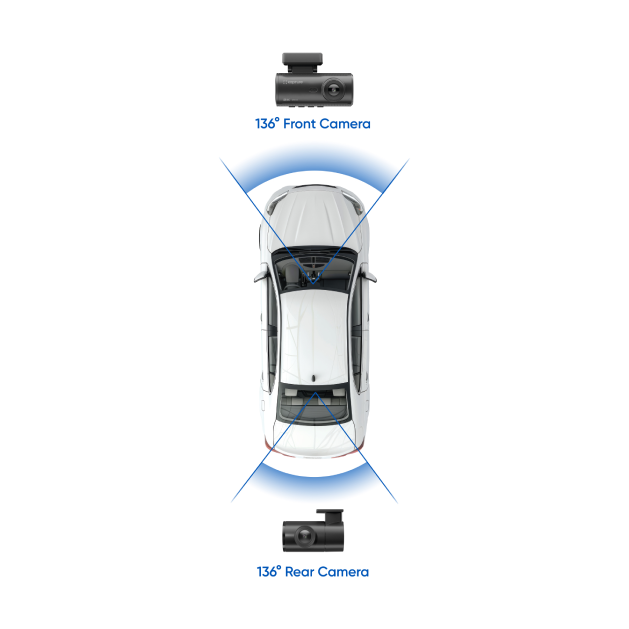
136° field-of-view ensures capture of essential details.

Records detected incidents while vehicle’s parked. Requires Hardwire Kit purchase (KPT-SHWK).


2K RESOLUTION
YES
MICRO SD CARD UP TO 256GB
NO
NO, REQUIRES HARDWIRE KIT (SOLD SEPARATETLY)
YES
YES
12V CAR CHARGER
NO

Our Help Centre offers an extended library of FAQs, as well as downloadable installation guides. We're here to step you through your installation process to ensure that your Kapture journey is a smooth one.


